Step by step guide to getting delisted from every Spamhaus blocklist, including the Zen combined list. Covers SBL, XBL, PBL, CSS, and DROP.
Spamhaus is not one blacklist.
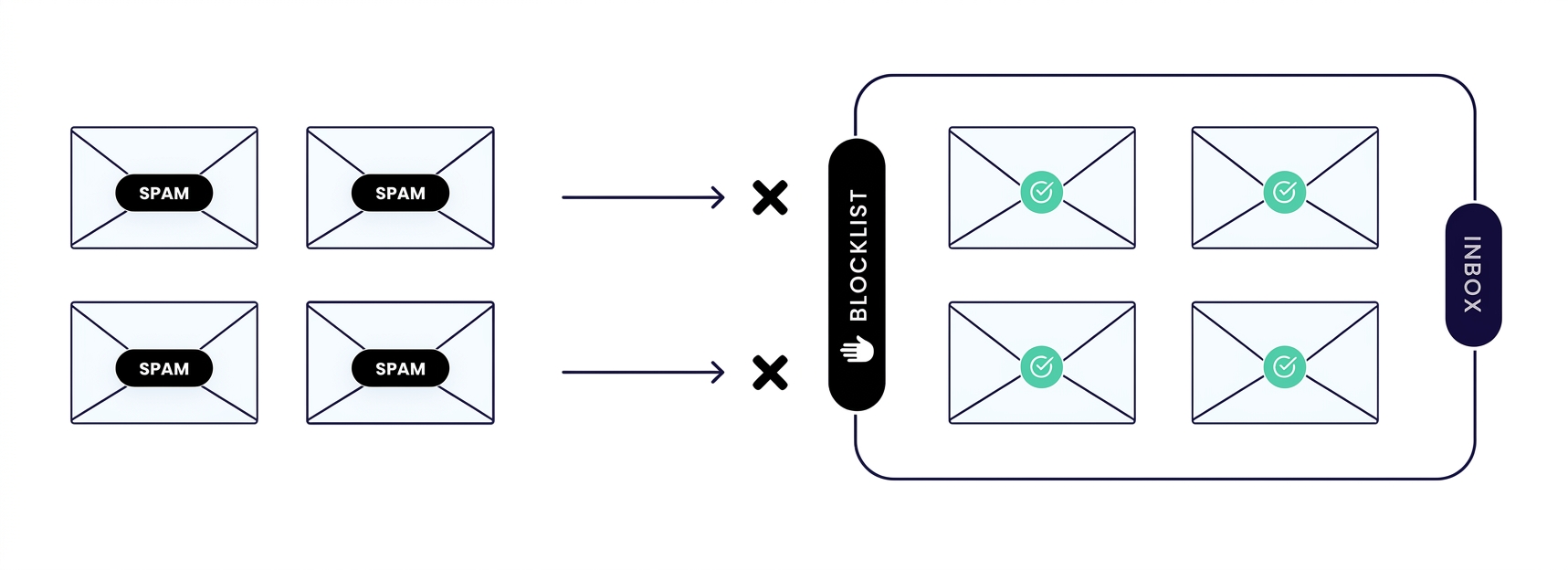
It is a group of separate lists, and the right way to get delisted depends on which one flagged you.
Most mailbox providers actually check the Zen list, which combines several of Spamhaus's lists into one lookup.
If your IP is blocked by a provider that mentions Spamhaus, there is a good chance Zen is involved, even if the provider did not say so directly.
What is Spamhaus Zen?
Zen is not a separate blocklist on its own. It is a combined lookup that checks several individual Spamhaus lists at once, so a mail server can do one check instead of several.
If you are listed on any of the lists Zen includes, you are effectively listed on Zen too, and that is usually the listing that actually blocks your mail, since it is the one most providers check.
Monitor Your IP Reputation
Actively monitor up to a /16 subnet (65, 536 IPs) for free. Receive a comprehensive overview of your IPs’ reputation.
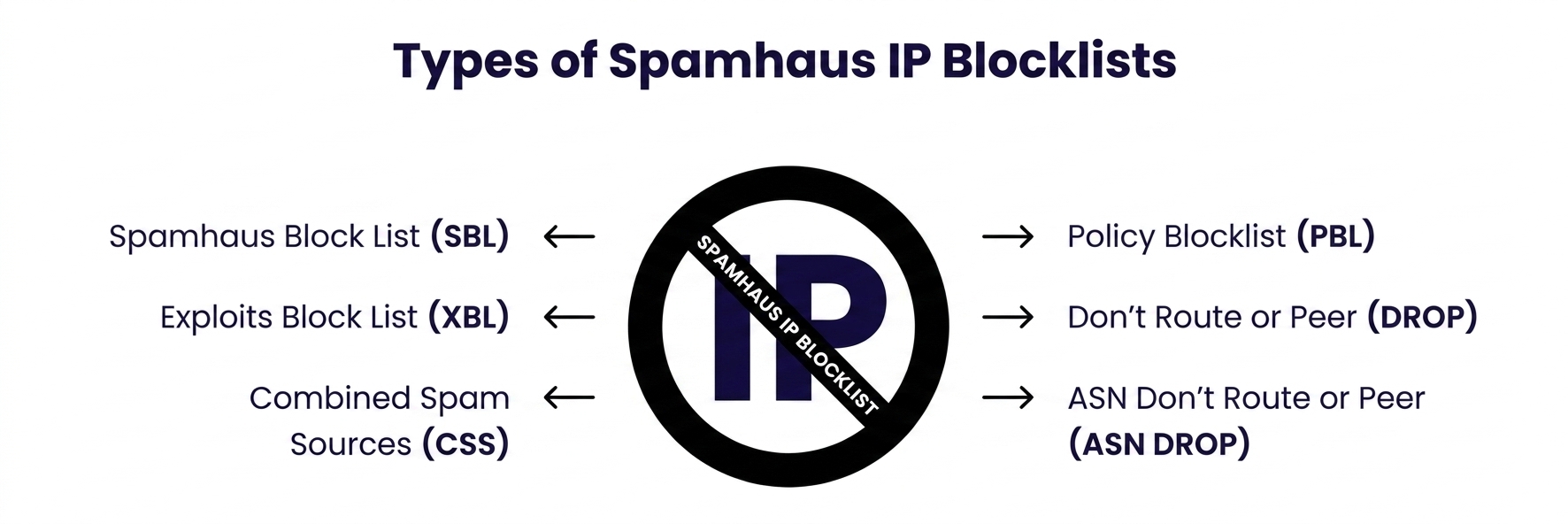
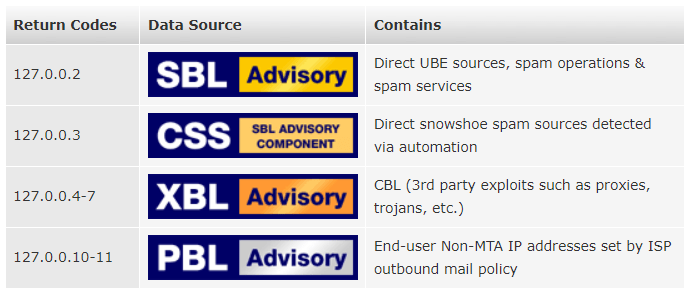
The individual Spamhaus lists, and what each one means
SBL (Spam Block List). This is the most common listing for digital marketers and bulk senders. It means Spamhaus has direct evidence your IP sent spam or was involved in similar activity. This is usually a complaint driven or spam trap driven listing.
XBL (Exploits Block List). This means Spamhaus detected signs of an infected or compromised machine sending mail without the owner's knowledge. This is often caused by malware, a hacked server, or an open proxy, not a deliberate sending decision.
PBL (Policy Block List). This one is different from the others. It is not based on bad behavior. It lists IP ranges that Spamhaus believes should not be sending mail directly, like dynamic residential IP ranges.
If you are here, your IP or range is likely just not meant to run a mail server directly, at least not without your ISP's permission.
CSS (Combined Spam Sources). This aggregates several automated spam data sources into one list. Like SBL, it usually reflects actual spam activity detected from the IP.
DROP and ASN DROP. These are the most severe listings, reserved for ranges Spamhaus considers hijacked, used for cybercrime, or run by bulletproof hosting operations.
If you land here, it typically means Spamhaus considers the whole network suspicious, not just one IP.
Step 1: Look up your IP on Spamhaus's checker
Run your IP through a checker that shows list level detail, not just a yes or no answer. Knowing you are "on Spamhaus" is not enough, since the fix is different for SBL than it is for PBL. Konetix's checker shows you exactly which Spamhaus list, or lists, flagged your IP.
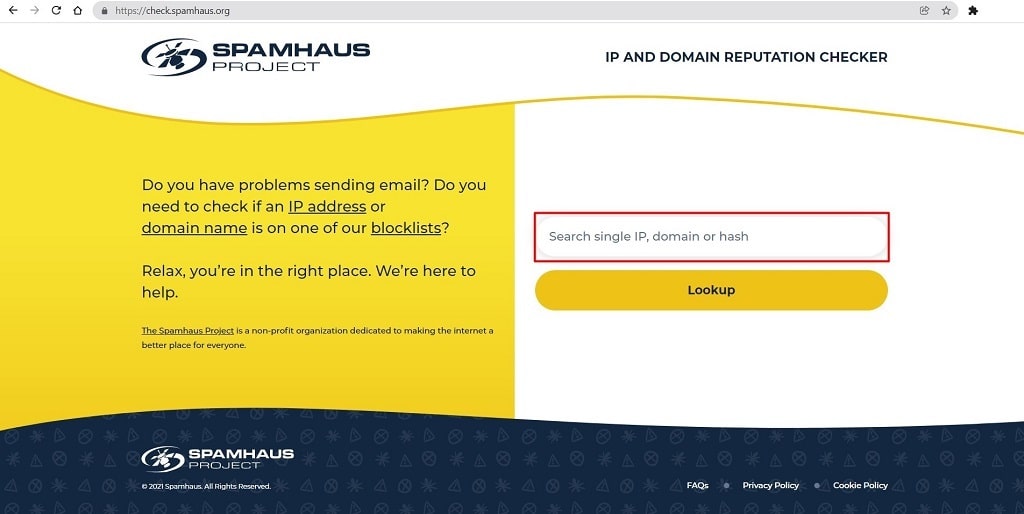
Before doing anything else, confirm exactly which Spamhaus list has flagged you. Spamhaus provides a free lookup tool for this, sometimes still referred to by its older name, the Blocklist Removal Center.
Enter your IP address and run the search.
How to get removed, by list type
If you are on SBL or CSS: you need to find and fix the actual cause first. This usually means identifying what sent the spam, whether that is a compromised account, a mailing list issue, or a genuine sending practice problem, and stopping it.
Removal requests submitted before the cause is fixed are usually denied, and Spamhaus notes that a false or premature request can hurt your case rather than help it.
If you are on XBL: the priority is finding and removing the infection or compromise. XBL listings often clear automatically once the source stops sending, but if you want it removed sooner, you can request removal once the machine is cleaned.
If you are on PBL: this is the most straightforward to fix if you legitimately own and control the IP. Single IPs can often be removed through a self service exclusion form on Spamhaus's site.
If you do not own the IP directly, meaning you are on a hosting provider's range, this needs to go through your provider, since PBL removal for a shared range is controlled at the ISP level.
If you are on DROP or ASN DROP: these are handled differently, generally through your ISP, since they reflect network level concerns rather than something one customer can resolve alone.
If you are on Zen specifically: fixing the underlying individual listing is what actually resolves the Zen listing, since Zen simply reflects whatever it finds on the lists it checks. There is no separate "remove from Zen" step beyond fixing the specific list you are actually on.
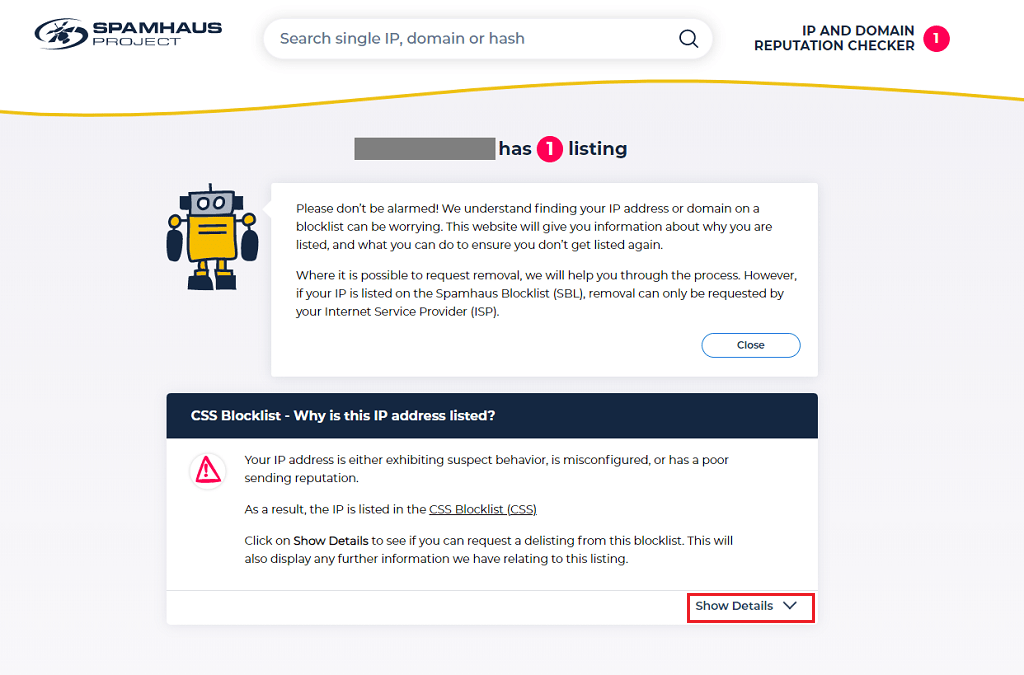
If your IP comes back with a listing, the tool will show a warning rather than a clean result. From there, look for a "Show Details" option, which reveals more specific information about why the listing happened. This detail matters, since it points you toward the actual fix rather than leaving you guessing.
If you do not manage the mail server yourself, or you do not have a technical contact who can dig into server logs, this may be a point where you need to loop in your hosting provider or ISP rather than trying to resolve it alone.
Step 2: Figure out why you were listed
Spamhaus maintains several separate lists, and each one reflects a different kind of problem.
An SBL or XBL listing usually points to a security issue, meaning something on your server sent spam or was compromised in a way Spamhaus detected.
To trace the source, review your server's mail logs for unusual activity, both from inside your network and from outside connections trying to use it.
This step is worth taking seriously before moving on. Submitting a removal request without first understanding and fixing the actual cause rarely works, and can make Spamhaus more skeptical of future requests from the same IP.
Step 3: Request removal, using the process that matches your listing type
The right removal steps depend entirely on which list flagged you. Spamhaus does not use one universal delisting form.
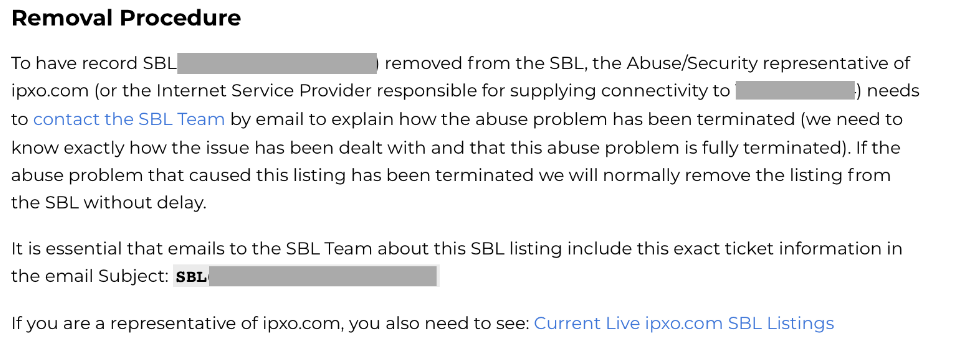
If you are listed on SBL: removal requests go through an email contact linked directly on the SBL listing page. Note that this channel is intended for ISPs, not individual end users. If your IP is part of a larger block controlled by an ISP, they will need to be the ones to reach out.
Spamhaus does respond to genuine requests, but a request made in bad faith, or before the underlying issue is actually resolved, tends to work against you rather than for you.
If you are listed on DROP: the process works the same way as SBL. Your ISP contacts Spamhaus directly, since DROP listings apply at the network level rather than to a single customer.
If you are listed on PBL: this is the one case where you may be able to handle removal yourself. If you control a single IP directly, Spamhaus provides a self-service exclusion form right on the listing page.
If you are trying to remove an entire subnet instead of one IP, that has to go through your ISP's Spamhaus ISP Portal account, since PBL ranges are managed at the provider level. If you own the IPs but have never set up an ISP Portal account, you will need to create one before you can proceed.
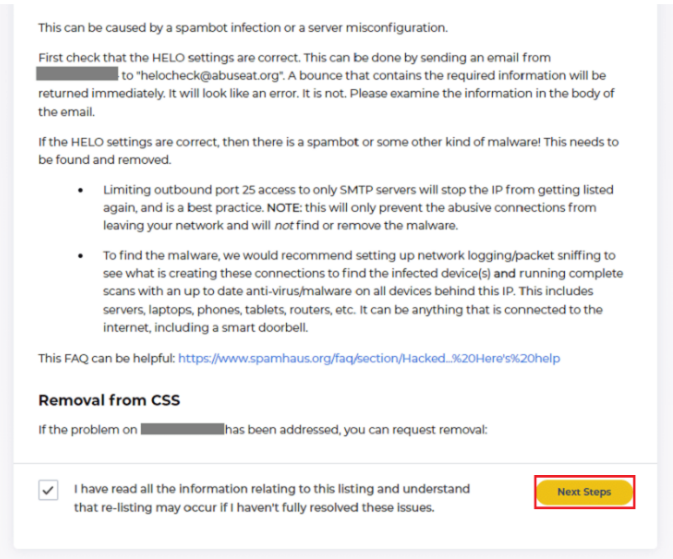
If you are listed on CSS or XBL: for a single IP, the removal process matches PBL's self-service form. These two lists are also designed to clear automatically over time once no further spam activity is detected, so if you are not in a hurry, the listing may resolve itself.
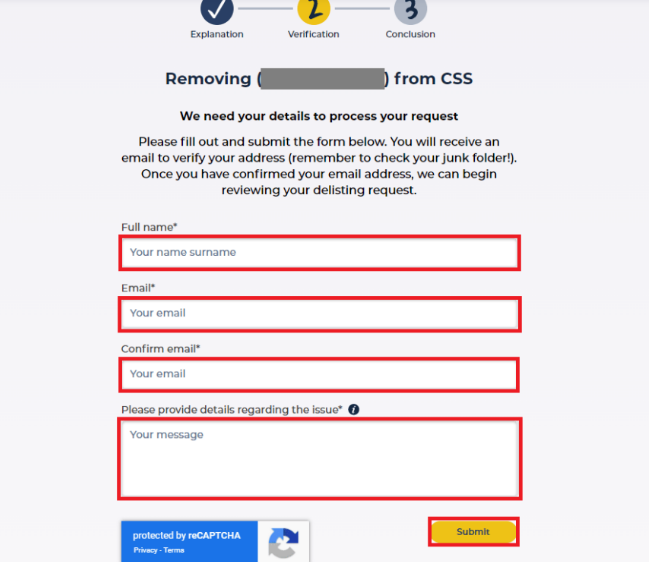
Once you have confirmed the issue is fixed, you can move straight to requesting removal without waiting out the automatic expiration. Look for a checkbox confirming you understand the process, then continue to the next step to submit your details.
After you submit, Spamhaus typically processes accepted requests quickly, often within a few minutes, though it can take up to 24 hours in some cases.
If your IP is still showing as listed after a full day, that is the point to contact Spamhaus's support directly for help, rather than resubmitting the same request repeatedly.
How long does it take
This depends on which list and whether the listing clears automatically or requires a manual request. XBL and CSS listings often expire on their own once the spam activity stops. SBL usually requires a manual request and review.
PBL is typically fast if it is a straightforward single IP exclusion. Spamhaus has said publicly that removal is not guaranteed just because a request is submitted, so a genuine fix matters more than a fast form submission.
(CTA repeated: "Check your Spamhaus status right now, free" links to accounts.konetix.net/sign-up)
Frequently Asked Questions
What is the difference between Spamhaus and Spamhaus Zen?
Spamhaus operates several separate lists. Zen is a combined lookup that checks multiple of them at once, so most mail providers use it instead of checking each list individually.
Can I get removed from Spamhaus if I have not fixed the underlying issue?
Generally no. Spamhaus reviews the actual cause, and a request submitted without a real fix is likely to be denied, and may make future requests harder.
How do I know which specific Spamhaus list is blocking me?
Use a checker that shows list level results, not just a general blacklist status. This tells you whether you are on SBL, XBL, PBL, CSS, or DROP, which determines the correct fix.
Does a Spamhaus PBL listing mean I did something wrong?
Not necessarily. PBL often reflects the type of IP range you are on, like a residential or dynamic range, rather than actual bad behavior.